Posts

MSSql Error 1088 - Cannot find the object "tuition_account_info" because it does not exist or you do not have permissions

Image
Following error is a simple and most easily seen error in transaction replication. The solution is also very simple. Read following blog to solve this in minutes. MSSql Error 1088 - Cannot find the object "tuition_account_info" because it does not exist or you do not have permissions Command attempted: if @@trancount > 0 rollback tran (Transaction sequence number: 0x00025E0E00011BE2000100000000, Command ID: 1) Let's Understand: The problem is that the object doesn't reside at the subscriber. The object is either deleted or was never created. There are two ways to resolve the problem: 1. Either uncheck the object name from the replication object list. 2. Or create the object in the subscriber with similer schema in publisher. Regards, Online Powershell and SQL Classes @ http://tuitionaffordable.webstarts.com
MSSQL Server Error: "Cannot generate SSPI context"

I got following alert on tow of my servers eg Tuitionaffordable11, Tuitionaffordable23: " Cannot generate SSPI context ". This error emerged when i try to connect these servers just like everyday work from other server. Some changes caused the connection broken for Tuitionaffordable11, Tuitionaffordable23. In 90% cases the issue is with spn settings. Let's go ahead and find the spn settings. Use following command to list all the spns setting: C:\>setspn -L TuteUTL12 Registered ServicePrincipalNames for CN=TuteUTL12,OU=General,OU=Terminal Servers,DC=tute,DC=net:         MSSQLSvc/Tuitionaffordable11.prod.tute.net:1433         MSSQLSvc/Tuitionaffordable23.prod.tute.net:1433 You can use following query to list all the spn settings for a particular account. setspn.exe -A MSSQLSvc/Tuitionaffordable11.PROD.tute.net:1433 MSSQLSvc/Tuitionaffordable11 MSSQLSvc/Tuitionaffordable12.prod.tute.net:1433 MSSQLS...

DBCC CheckDB The operating system returned error 21(The device is not ready.)

Will Indian Rupee Cross 55?? Following error can be very difficult to deal with this error if not dealt properly. "DBCC CheckDB The operating system returned error 21(The device is not ready.)" Please follow following steps carefully. 1. run xp_readerrorlog and find the recent errors. 2. run xp_fixeddrives to see if all the drives can be read from sql server. 3. Look for the eventviewer. The issue can be some RAID controller or other h\w sources. 4. Don't detach the DB. 5. Look for restoring the latest backup if the problem is still a panic. 6. Do NOT restart neither your m\c nor your sql service. Along with technical learning I would like to share some great articles for anyone interested in the betterment of his/her family life Quality time with kids: Let's have a Quality Audit Parental guidance how to control your kid in elementary school not obeying teacher Parental guidance for child development post terrible twos Parenta...

Shrinking DB Cause Increase In Fragmentation

Image
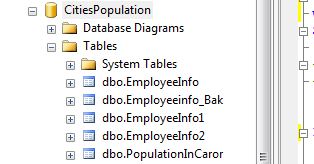
Let's understand how shrinking Database can increase Index fregmentation. When the DB is shrunk, the sql server db engine goes at the end of the data pages located in the database and adjust them in the size mentioned for shrink activity. This is the reason why shrink causes data pages unorganized and result in fragmentation. Let's create a database name CitiesPopulation. and some tables like EMployeeInfo EmployeeInfo1 EmployeeInfo2 PopulationInCaror Get the DBId from the output of below query- select * from sys.sysdatabases For my database CitiesPopulation, the DBid is 7. Now check for the index fregmentation status in your Database with the help of below query- SELECT *  FROM sys.dm_db_index_physical_stats(7, null, null, null, null) You can also check the fregmentation for a perticular table by giving the object_Id in the above query e.g. SELECT *       FROM sys.dm_db_index_physical_stats(7, OBJECT_ID('Employeei...

MS Sql Server Installation Make Easy

This blog is intended to help the first time users of sql server to interact sql server easily. So let's understand what we should know while installing sql server. SQL server is very interactive database engine. You will find this far more interesting when you install and start using this. Sql server comes in many editions specific to usage. a. SQL Server Enterprise Edition - Specific for enterprise environment b. SQL Server Developer Edition  - This has all the features same as Enterprise Env. This edition can be used only for development work just like writing codes but can't be used as a back end for the application in any enterprise. c. SQL Server Standard Edition  - This supports four cpus. "How to find the number of physical and logical CPUS?" . This some lesser features than the enterprise and developer editions. As I am writing this wire for the users who are using for the first time so I shall not go deep defining the difference between these editions...

Understand Query Execution Plan- Index Scan, Index Seek And Key Lookup

Image
Will Indian Rupee Cross 55?? It is always recomended to use either Clustered or NonClustered Index on a table for better performance of query execution. In this blog I  shall describe some important features of an Index which will help you to understand how Index plays a role in query execution i.e.-  a-Clustered Index Scan  b-Clustered Index Seek  c-Key lookUp (In SQL Server 2008 it is KeyLookup and it was BookMark lookup in SQL Server 2005)  Let's Do- I am creating a table by copying the data from an existing table EmployeeInfo, which is a very simple table having only four columns, see below (You can also create a fresh table)- EmployeeInfo1 SELECT   * INTO EmployeeInfo1 FROM EmployeeInfo EmployeeInfo1 table looks like- Let's Do- Create Clustered Index on EmpID(INT, Identity) in EmployeeInfo1 with FillFactor=100 CREATE CLUSTERED INDEX X_EmpId_EmpInfo1ON EmployeeInfo1(EmpID) WITH (FILLFACTOR = 100) Now if you will check th...

MSSQL Interview Question Clustering- Part4

Q: What is the standard setting of Lookslive, IsAlive and Pending Timeout? Ans: LooksAlive - 5 sec IsAlive - 30 sec Pending Timeout - 180 sec Note- Do not modify Pending Timeout. The value, represented in seconds, is the amount of time the resource in either the Offline Pending or Online Pending states has to resolve its status before the Cluster Service puts the resource in either Offline or Failed status. Q: Can you change failover policy? If Yes then how? Ans: To configure the failover policy, in the Threshold box, enter the number of times the group is allowed to fail over within a set span of hours. In the Period box, enter the set span of hours. For example, if Threshold is set to 10 and Period is set to 6, the Cluster Service fails the group over a maximum of 10 times in a 6-hour period. At the 11th failover in that 6-hour period, the server cluster leaves the group offline. This affects only resources that were failed over; therefore, if the SQL Server resource fail...